 Battery & EV automation
Your energy.
Better timed.
Make more of your solar, home battery and EV. PowerSync coordinates charging and exports around your energy prices, so you spend less time managing them.
Cloud from $4.99 AUD/month. Home Assistant is free for non-commercial use.
Coverage across the Home Assistant integration. PowerSync Cloud controls Tesla Powerwall and FoxESS batteries with six retailer options.
Choose how PowerSync works for you.
Choose Cloud for hosted battery and EV control. Choose Home Assistant for broader hardware support, a 48-hour optimiser and control from your own setup.
PowerSync Cloud
From $4.99/month AUD · 7-day free trial
- Tesla Powerwall 2 & 3 and FoxESS battery control
- Runs 24/7 in the cloud — your phone can be off
- Tesla vehicle and OCPP charger control on the $7 plan
- iOS, Android and web dashboard included
PowerSync for Home Assistant
Free for non-commercial use · source-available
- 13 battery brands, plus custom/external controller setups
- Plan battery charging and exports up to 48 hours ahead
- EV charging with Tesla, OCPP, Zaptec and more
- Energy dashboard created during setup










 SolarEdge
Anker Solix
SolarEdge
Anker Solix
PowerSync Cloud
Connect your Tesla Powerwall or FoxESS battery and let PowerSync manage price-based automations in the cloud. Add solar-aware EV charging with the Battery + Vehicle plan. No Home Assistant server required.
★ 7-day free trial of your selected plan
Keep negative export prices in check.
PowerSync checks export prices every five minutes and manages battery export when prices turn negative. Built-in checks help avoid repeated switching as prices move around the threshold.
- Price checks aligned with five-minute market intervals
- Switching intervals and daily limits reduce unnecessary changes
- Repeated price checks help filter out brief fluctuations
- Automatic recovery checks help restore normal operation
Make the most of wholesale price spikes.
On supported wholesale-export plans, PowerSync watches for price spikes and adjusts your Powerwall settings to encourage exports above your chosen threshold. It saves your existing tariff for restoration after the event.
- Polls AEMO once a minute across NSW1, QLD1, VIC1, SA1 and TAS1
- Repeated checks reduce switching around the threshold
- Your original tariff is saved before changes are made
- Takes priority over negative-price curtailment when both apply
Put surplus solar into your next drive.
Use surplus readings from your Tesla or FoxESS battery to adjust EV charging. Connect a Tesla vehicle or a compatible OCPP charger directly to PowerSync Cloud.
- Tesla Stop, Auto and Charge Now, with charge limit and Ready By
- OCPP Solar and Charge Now with configurable current limits
- Surplus measured after the home battery takes its share
- Command limits help reduce unnecessary vehicle wake-ups
Everything in PowerSync Cloud
Vehicle features require the $7 plan; optimiser access is in betaNegative-price curtailment
Blocks export while feed-in prices are negative, with hysteresis, transition caps and an auto-restore watchdog.
AEMO spike export
Force-exports through wholesale price spikes on supported wholesale-export plans, then restores your saved tariff.
Tariff sync
Pushes your time-of-use schedule straight to the Powerwall so it prices its own decisions correctly.
Automations
Schedule battery charging, discharging and EV charging, or trigger actions when prices reach your chosen level.
Tesla vehicle charging $7 plan
Solar-aware charging via the Fleet API, with Stop / Auto / Charge Now, charge limit and Ready By.
OCPP charger control $7 plan
Cloud OCPP 1.6-J central system — Solar and Charge Now modes with configurable current limits.
Battery statistics
Pack health, cycle counts and energy history, including BMS-level scans of your Powerwall.
Manual force control
Force charge, force discharge and off-grid islanding with an override cooldown, from web or mobile.
Multiple sites
Switch between every energy site on your account — each with its own retailer, region and automation settings.
Passkeys & 2FA
First-party email sign-in with passkey support and optional authenticator 2FA from Settings.
AI tariff optimiser Beta
Cloud charge/discharge scheduler for tariff-aware planning. In tester beta — ask on Discord for access.
Set up in four steps
About five minutes, start to finishSign in
Create a PowerSync account with email and password. Add a passkey or authenticator 2FA from Settings.
Connect a provider
Authorise Tesla on Tesla's own login page, or connect FoxESS Cloud with an OpenAPI key, then link your site.
Pick region & tariff
Choose your NEM region and retailer so pricing, curtailment thresholds and spike detection line up with your plan.
Enable automations
Turn on curtailment, tariff sync and spike export. Add a vehicle or OCPP charger on the $7 plan and you're done.
What Cloud connects to
Hosted connections — nothing runs on your networkBatteries 2
- Tesla Powerwall 2 & 3 — Fleet API
- FoxESS — Cloud OpenAPI
Retail plans 6
- Amber Electric
- GloBird Energy
- Energy Locals
- Flow Power
- CovaU SolarMax
- Other wholesale pass-through
EV charging 2
- Tesla vehicles — Fleet API
- OCPP 1.6-J charge points
- Both require the $7 plan
Apps 3
- iOS — TestFlight
- Android — Google Play
- Web — powersync.cc/app
Automatic AEMO tariff controls need a wholesale-exposed plan. GloBird plans such as FourForFree and Zero Hero are not wholesale pass-through — those sites use their configured Tesla tariff as a fixed/TOU price source instead. Separate spike-export controls support eligible GloBird ZeroHero sites through explicit opt-in.
PowerSync for Home Assistant
Bring battery planning, EV charging and solar control into Home Assistant. Build a 48-hour energy plan around your prices and forecasts, with support for 13 battery brands and retailers across Australia, New Zealand, the UK and Europe.
★ Built and maintained in spare time — sponsorships keep it moving
A battery plan that adapts to your day.
The optimiser uses your energy prices, solar forecast and household usage to plan when to charge and discharge. It updates the schedule as forecasts change, helping you make better use of your battery.
- 48-hour horizon, re-solved as prices and forecasts update
- Profit Max, Charge By Time, forecast reserve and planned EV load
- Measured quota settlement for GloBird ZeroHero/ZeroCharge and CovaU SolarMax
- Needs a solar forecast — Solcast, Open-Meteo Solar Forecast or Volcast
The optimiser is actively developed. Unusual tariffs and battery configurations can still surprise it — report anything odd on Discord with your tariff and action plan.
Charge your EV around your home.
Coordinate EV charging with your home battery. Choose solar-first charging, lower-cost charging or a departure deadline, using Tesla vehicles or supported charger integrations.
- Solar Only — excess solar, plus any active free-grid period
- Prefer Solar — solar first, cheap grid to top up
- Cheapest — charge in the cheapest windows, grid or solar
- Meet Deadline — hit your departure time using the cheapest windows available
EV charger support is experimental and depends on your charger's HA integration exposing the right entities and services.
Manage solar beyond your battery inverter.
A separate solar inverter may keep exporting even when battery exports are limited. PowerSync can adjust supported inverters around household demand and restore their previous limits when curtailment ends.
- 10 inverter brands, each through its own native limit
- Fronius SunSpec WMaxLimPct, Enphase DPEL, Huawei feed-grid limit and more
- DC-side curtailment on Sigenergy and AlphaESS
- Restore checks help confirm that previous limits are reapplied
Flexible Exports reads a fail-closed operating envelope from certified site equipment. This release is monitoring-only while the SAPN site soak completes; PowerSync is not a CSIP-AUS client and provides no network-limit override.
Everything in the integration
Included for non-commercial use; optional AI provider costs applySmart Optimization
HiGHS LP solver over a 48-hour horizon with greedy fallback, Profit Max, Charge By Time and forecast reserve.
EV smart charging
Solar Only, Prefer Solar, Cheapest and Meet Deadline across Tesla, OCPP, Zaptec, Sigenergy and generic chargers.
AEMO spike export
Detect wholesale spikes and force-export the battery on supported wholesale pass-through and VPP plans.
Solar curtailment
Load-following inverter limiting across 10 brands, plus DC curtailment on Sigenergy and AlphaESS.
Tesla Storm Watch
Enable, disable or automate Tesla's predictive pre-charging ahead of severe weather.
Tesla VPP enrollment
Enroll or unenroll in Tesla grid-services programs from Home Assistant or the mobile app.
Off-grid control
Disconnect a supported Powerwall site from the grid using a paired local connection.
Auto Lovelace dashboard
Power flow, price charts, controls and the TOU schedule — built into your sidebar on first setup.
Battery health scans
Track Powerwall battery health using readings from its local battery management system.
Custom controller mode
Point PowerSync at your existing HA telemetry entities and get planner-only optimisation while your controller keeps dispatch.
Flexible Exports Monitoring-only
Reads a fail-closed operating envelope from certified site equipment. Active enforcement stays release-gated.
AI plan explanation Optional
Ask why the optimiser chose a plan and get it in plain English. Bring your own provider; billing is yours.
Install in four steps
HACS custom repository — about five minutesAdd the repository
HACS → three dots → Custom repositories. Add the repo as an Integration.
bolagnaise/PowerSync
Download & restart
Search HACS for PowerSync, click Download, then restart Home Assistant.
Pick your retailer
Settings → Devices & Services → Add Integration → PowerSync, then enter your provider credentials.
Connect your battery
Choose your battery brand and connection method — or custom/external controller — and the dashboard builds itself.
What the integration connects to
Local Modbus, vendor cloud, or an existing HA integrationBatteries 13
- Tesla Powerwall 2 & 3
- FoxESS H1, H3, H3-Pro, KH
- Sigenergy
- GoodWe ET, EH, BT, BH, ES, EM, BP
- Sungrow SH-series
- AlphaESS SMILE, Storion
- Solax Hybrid X1/X3, Gen4–6
- ESY Sunhome HM
- SAJ H2 / HS2
- Fronius GEN24 BYD / Reserva
- Neovolt / Bytewatt
- SolarEdge Home Battery
- Anker Solix
- Custom / external controller
AC-coupled solar 10
- Fronius SunSpec Modbus
- Enphase IQ Gateway REST
- Huawei Smart Dongle
- Sungrow SG and SH
- GoodWe
- FoxESS
- Solax
- Sigenergy
- AlphaESS
- Zeversolar HTTP API
Retailers 9
- Amber Electric AU
- Localvolts AU
- Flow Power / AEMO AU
- AGL Battery Rewards AU
- GloBird / AEMO VPP AU
- CovaU SolarMax AU
- Octopus Energy UK
- EPEX Day-Ahead EU
- NZ TOU NZ
EV chargers 5
- Tesla vehicles Fleet API, Teslemetry, BLE
- OCPP chargers
- Zaptec HA entity or Cloud API
- Sigenergy EVAC / EVDC
- Generic switch + current entity
Several brands connect through a companion HACS integration — Solax Modbus, ESY Sunhome, SAJ H2 Modbus, Fronius Modbus and Neovolt Modbus. The wiki lists the exact connection method and control set for each.
The token helper is for HA users — it shows your Tesla token to copy into the integration. No developer account, no fee.
Cloud or Home Assistant?
Start with your hardware and how you want to manage it. Cloud runs on our servers; the Home Assistant integration runs on yours.
Scroll across to compare both options on smaller screens.
| Feature | Cloud | Home Assistant |
|---|---|---|
| Getting started | ||
| Price | $4.99 or $7/mo AUD | Free, non-commercial |
| Anything to install | NothingSign in and go | Home Assistant + HACS |
| Where automations run | PowerSync CloudConnected hardware needs internet access | Your Home Assistant serverConnectivity depends on your integrations |
| Mobile app + web dashboard | ✓ | ✓ via HA URL + token |
| Hardware | ||
| Battery brands | 2 Tesla, FoxESS | 13 + custom controller |
| AC-coupled inverter curtailment | — | ✓ 10 brands |
| EV smart charging | ✓ Tesla + OCPP 1.6-J, $7 plan | ✓ Tesla, OCPP, Zaptec, Sigenergy, generic |
| Retailers & markets | 6 Australia | 9 AU, NZ, UK, EU |
| Automation | ||
| Negative-price curtailment | ✓ | ✓ |
| AEMO spike export | ✓ | ✓ |
| Tariff sync to Powerwall | ✓ | ✓ |
| Battery optimisation | Beta AI tariff optimiser, tester access | ✓ 48-hour plan, HiGHS solver |
| User-defined automation rules | ✓ | ✓ plus all of HA's |
| Off-grid / islanding control | ✓ Powerwall pairing | ✓ Powerwall pairing |
| Tesla Storm Watch & VPP enrollment | — | ✓ |
| Battery health / BMS scans | ✓ pack health, cycles | ✓ local TEDAPI |
Choose Cloud if…
You have a Powerwall or a FoxESS system, you're on Amber, GloBird, Energy Locals, Flow Power or CovaU, and you'd rather pay a few dollars a month than run a server. Add the $7 plan if you want the car charging on solar too.
Choose Home Assistant if…
You already run HA, you have hardware Cloud doesn't reach, or you want the full optimiser, AC-inverter curtailment and Tesla grid-services controls. It's free, and the Tesla token helper is free with it.
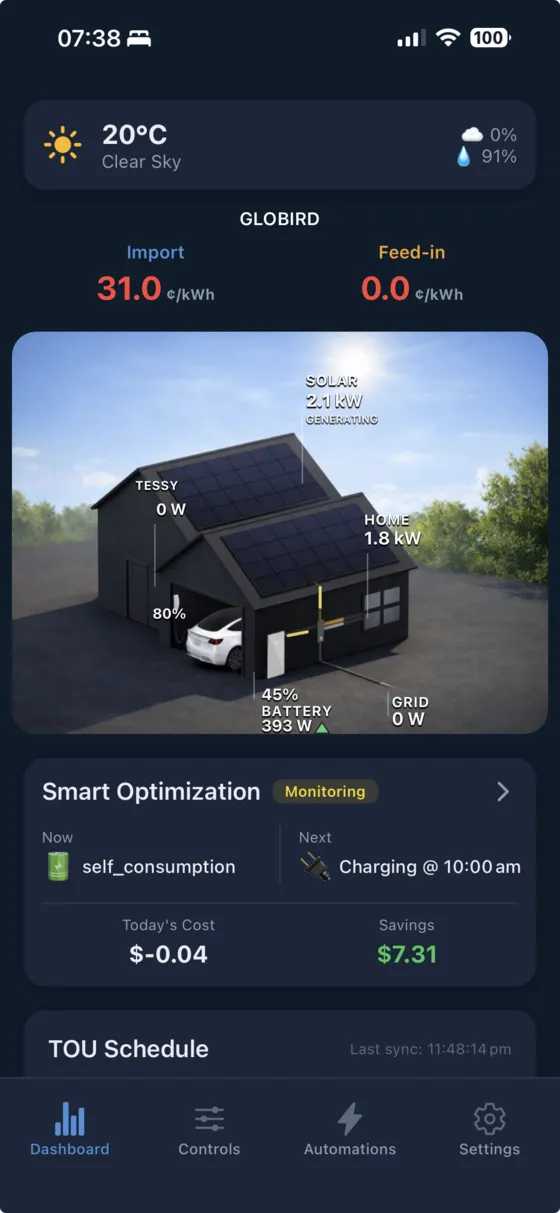
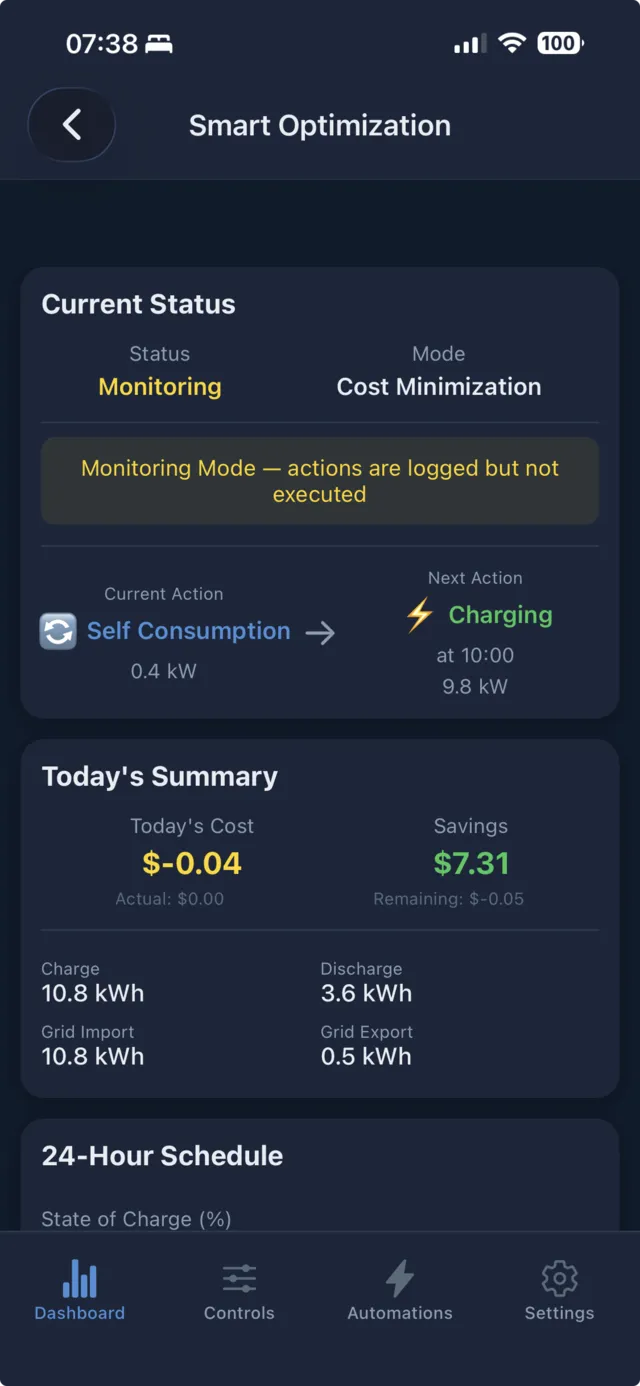
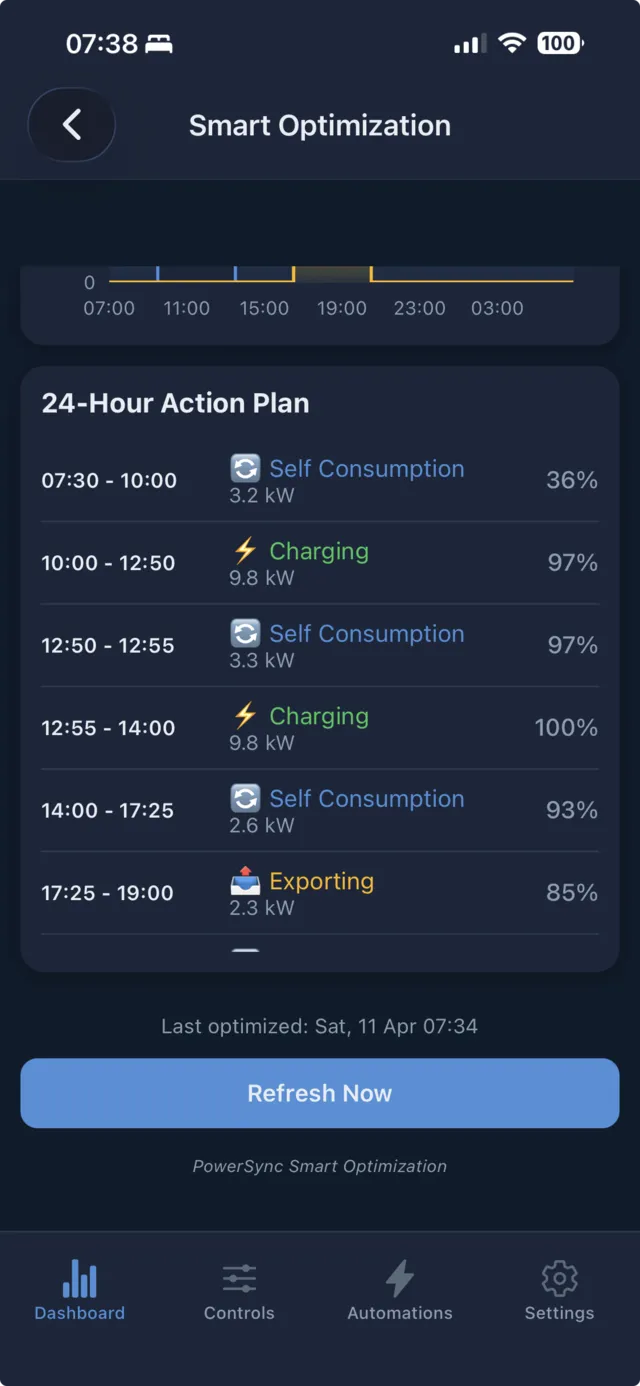
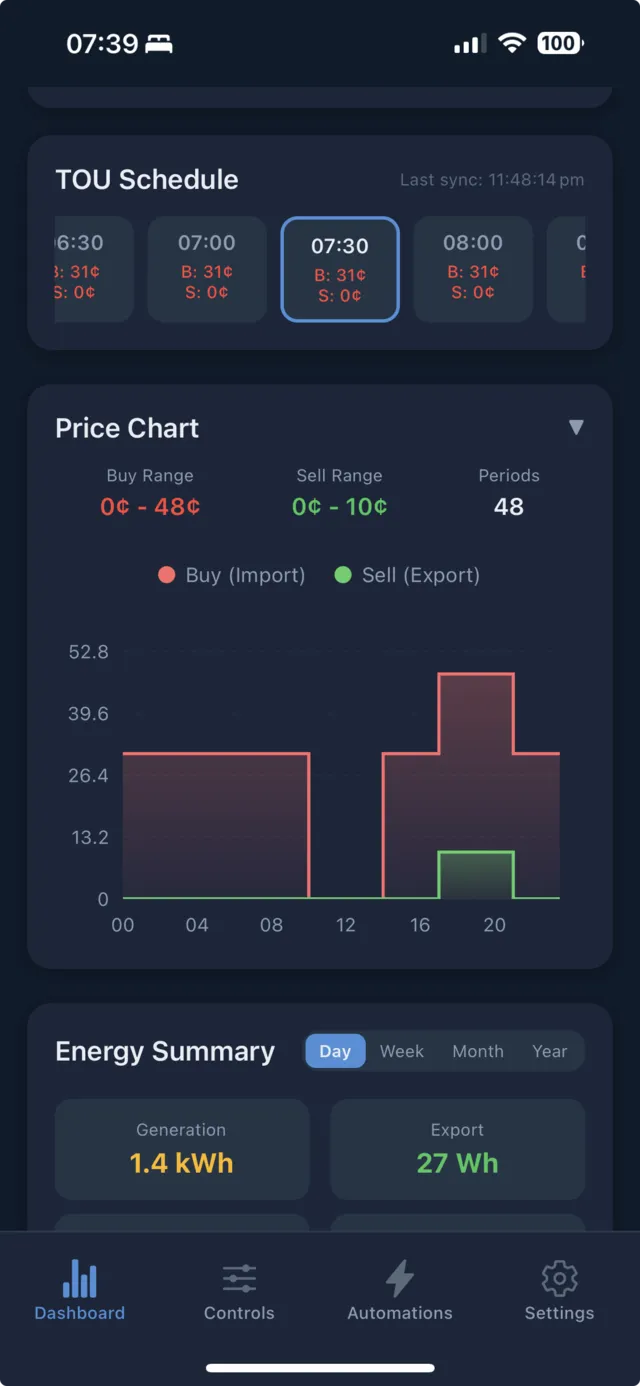
Your energy, at a glance.
See energy flows, review prices and manage your system from the same mobile app. Sign in to PowerSync Cloud or connect your Home Assistant setup. Available features depend on your setup.
The right plan for your setup.
Try a Cloud plan free for seven days, then pay monthly in AUD. Cancel any time. The Home Assistant integration is free for non-commercial use.
Home Assistant
For your own server and a wider choice of hardware.
Non-commercial use · source-available
- 13 battery brands + custom controller
- 48-hour battery optimisation
- EV smart charging, four modes
- AC-coupled inverter curtailment
- AEMO spike export & Storm Watch
- Auto-built Lovelace dashboard
- Free Tesla token helper
Cloud — Battery
Hosted automation for your Powerwall or FoxESS battery.
7-day free trial · cancel any time
- Tesla Powerwall 2 & 3, FoxESS control
- Negative-price curtailment
- AEMO spike export
- Tariff sync to your Powerwall
- Automations & manual force control
- Battery statistics and pack health
- iOS, Android and web
Cloud — Battery + Vehicle
Battery automation and solar-aware EV charging together.
7-day free trial · cancel any time
- Everything in the Battery plan
- Tesla vehicle charging via Fleet API
- OCPP 1.6-J charge point control
- Solar, Stop, Auto and Charge Now modes
- Charge limit and Ready By scheduling
- Configurable current limits
- Surplus measured at the battery
Support PowerSync development
The Home Assistant integration is source-available and free for non-commercial use — built and maintained in spare time. If it's saving you money, consider sponsoring to keep new features and battery brands coming.
Sponsor on GitHub